P4 Merge: Changes at a Glance
P4 Merge for Perforce P4 (formerly Helix Core) tracks and compares the effects of past and pending work for branches and individual files. This free side-by-side file comparison tool is used and loved by developers and designers to visualize merges, obtain comprehensive file history, and compare a broad range of image files.
See Your Merges
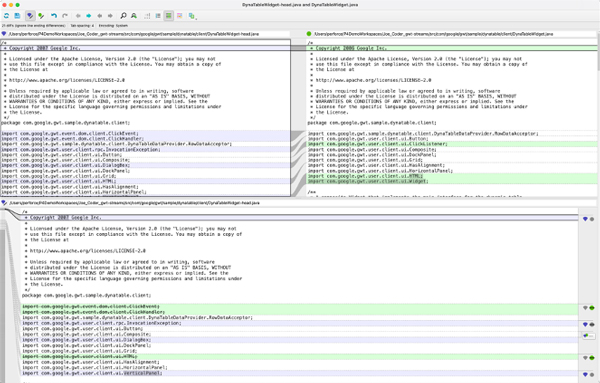
View differences between file versions and resolve conflicts quickly. P4 Merge is highly configurable, letting you:
- Highlight and edit differences in text files.
- Include or ignore line endings and white spaces.
- Recognize line-ending conventions for Windows, Mac, and Unix.
- Display line numbers during file comparisons and merges.
Track Project History
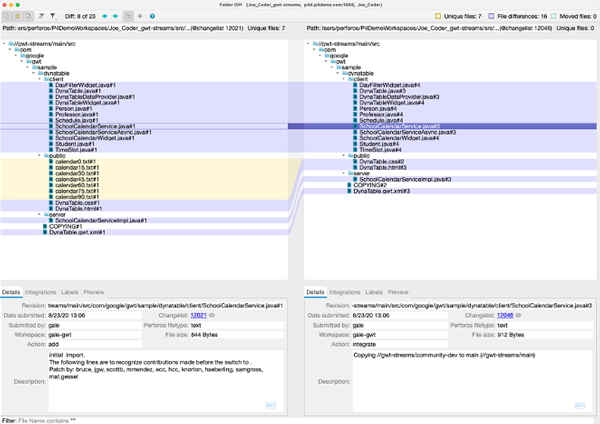
Want to see what changed in your project? The Folder Diff feature in P4 Merge lets you track changes between any two folders within your P4 environment. Use it to:
- See what code has been modified, added, or deleted between two specific points in time.
- Identify code that needs to be resolved in pending merges.
- Exclude files that are unique, unchanged, or meet specific criteria by name or extension.
- Maintain a clear view of modified assets in a familiar file/folder structure.
Instantly Compare Images
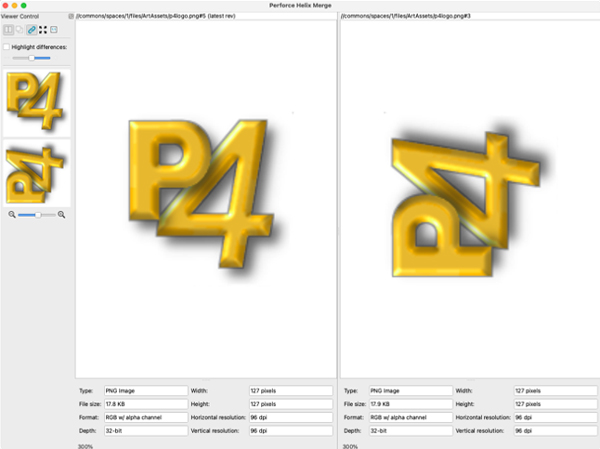
Overlay two images for quick and straightforward visual comparisons with the P4 Merge Image Diff Feature. You can also:
- Compare images in JPEG, GIF, TIFF, BMP, and more formats.
- Use the Qt API to customize and enhance functionality.
- Overlay images or see them side-by-side for a clear comparison.
- Highlight differences on overlaid images to easily see changes.
How To Use Image Diff in P4 Merge
Watch this brief tutorial video to learn how to use P4 Merge’s image diff function.
Perforce P4 is the Industry Standard
Trusted by
19/20
Top AAA Game Dev Studios
82%
Rated P4’s ability to scale as “Best in Class”.*
100%
Realized a return on their investment within 2 years.*
Trusted by
9/10
Top Semiconductor companies
*Survey data gathered from 2023 customer survey.
Download P4 Merge and Boost Productivity
Everyone on your team can get more done with P4 Merge. It's fully integrated with P4V and P4, and compatible with other popular version control systems like Git.
Get Started with P4
If you don’t yet have P4. Get started for free for up to 5 users and 20 workspaces.